BLOG
The Coming End of Shopify Legacy Customer Accounts: What You Need to Know About Shopify Customer Accounts and Extensions
Understand Shopify's deprecation of legacy customer accounts and learn how to seamlessly transition to the new passwordless framework without breaking your custom customer portals.
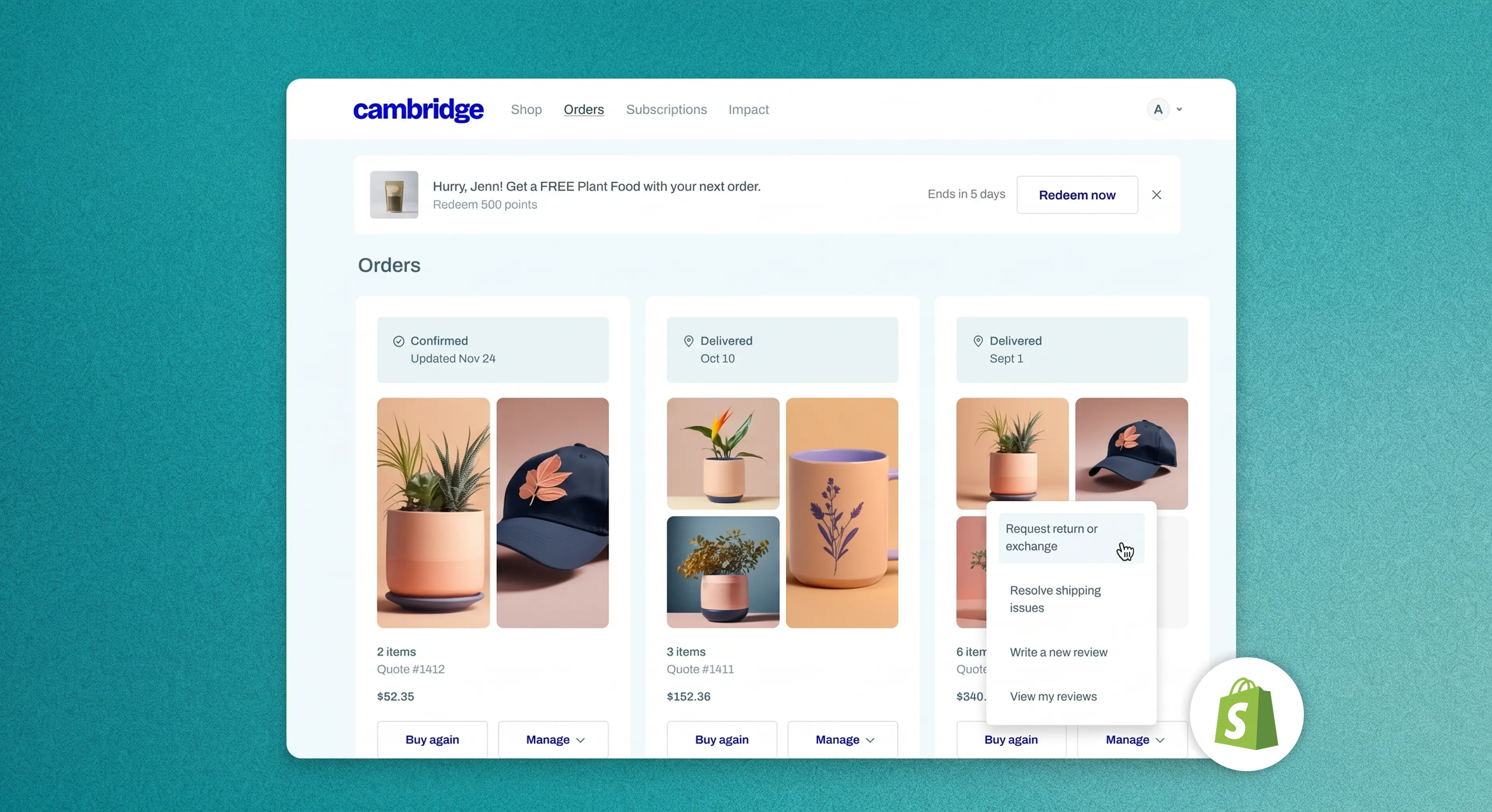
As of February 26, 2026, Shopify officially is deprecating its legacy customer account system.
While existing merchants can still temporarily use classic accounts (legacy accounts), new stores no longer have access to them. More importantly, all feature development, technical support, and security patches for the legacy system have ceased. With a final sunset date expected later (the exact date yet to be announced), the clock is ticking for brands to transition to Shopify’s new Customer Accounts framework.
Here is what this architectural shift means for your store and why migrating now is the best move for your business.
Why You Must Act Now to Prevent Broken Portals
Under the old system, Shopify allowed merchants to heavily modify the "My Account" and “Account Registration” areas using Liquid templates (such as customers/account.liquid or customers/login.liquid). Over the years, many brands built highly customized portals embedding loyalty points, subscription management, workflows, and bespoke registration fields directly into the theme code. The latter (bespoke registration fields) being extremely popular for brands to collect first-party data, such as birthdays, gender, locaton etc during customer account registration.
The deprecation means these legacy Liquid templates will eventually be locked and entirely removed. If you wait until the final sunset date to migrate, any deep integrations reliant on those classic files will break. Failing to prepare could lead to:
- Login failures: Customers may find themselves locked out of their accounts.
- Broken integrations: Loyalty dashboards, subscription portals, and custom B2B workflows could vanish from the customer interface.
- Support ticket spikes: Your customer service team could be overwhelmed by frustrated buyers wondering where their order histories went.
By acting proactively, merchants can audit their existing customizations, test the new framework in a safe environment (by duplicating their checkout configuration), and ensure a seamless handover before the hard deadline forces the change.
The Shift to Passwordless Logins: Better Security and UX
Why undergo this massive transition? The new Customer Accounts system was redesigned from the ground up to meet modern ecommerce expectations, starting with how users actually log in.
Instead of forcing shoppers to create, remember, and inevitably forget passwords, the new framework relies entirely on passwordless authentication. Customers now sign in using a one-time 6-digit passcode (OTP) sent directly to their email - or via seamless social logins and Shop Pay if you activated it for your store.
This movement toward passwordless authentication offers profound benefits:
- Zero Password Friction: Eliminating the dreaded "forgot password" loop speeds up access, directly reducing checkout abandonment and login-related support tickets.
- Enhanced Security: Passwordless logins neutralize credential stuffing attacks and protect your store from data breaches tied to reused, weak passwords.
- Native Out-of-the-Box Features: The new system natively supports self-serve returns, B2B purchasing flows, and integrated store credit - features that previously required heavy custom coding or third-party solutions. (And of course, you can still use your preferred third-party solutions for deeper feature capabilities and integrations etc).
The Power of Customer Account Extensions
Since Liquid modifications are being phased out, how do you customize the new portal? The answer lies in Customer Account UI Extensions.
Instead of editing raw theme code, customizations are now handled through App Blocks within Shopify’s visual editor. The account area now operates in a sandboxed environment, entirely decoupled from your storefront theme. This means any customizations you add via apps are completely upgrade-safe, secure, and will never conflict with future Shopify backend updates.
Shopify’s growth since 2006 has been due to its open app ecosystem. When the Shopify App Store first opened, it revolutionized the industry by shifting ecommerce away from rigid, one-size-fits-all platforms to modular, customizable stores powered by the app ecosystem. Despite all this “customization talk” with third-party apps and the ecosystem, Shopify’s default “My Account” and “Account Registration” pages were pretty static, uninspiring, and required expert coding ability to edit. The new Customer Account UI Extensions framework brings Shopify’s app ecosystem approach specifically to the customer account page - allowing app developers to build customer account extensions (apps) specifically for customer account experiences and features - so merchants like you can customize your account experience better.
The Fear of Losing Custom Registration Data (And How to Solve It)
One of the biggest anxieties brands face with this transition is the potential loss of custom registration fields. In the legacy system, it was easy to hardcode a few extra fields into the Liquid registration form to collect zero-party data like phone numbers, birthdates, skin types, or product preferences.
Because Shopify’s new Customer Accounts use a standardized, passwordless login flow, those old custom Liquid registration forms will no longer work. For brands that rely on that data to fuel personalized marketing, this broken pipeline is a massive risk.
This is exactly where OMNI by Wave Commerce bridges the gap.
OMNI is built specifically to integrate seamlessly into Shopify’s new Customer Accounts. Instead of losing your ability to collect essential data, OMNI allows you to build custom registration flows right inside the new portal.
- Keep Collecting What Matters: Securely gather phone numbers, birthdays, and unique customer preferences without interrupting the seamless new login experience.
- Turn Registration into a Loyalty Engine: OMNI doesn’t just collect data; it connects it directly to your loyalty and VIP programs. You can instantly reward customers with points for completing their profiles.
- Future-Proof Data Pipeline: Because it is built on Shopify's new, secure UI extension framework, your custom fields will never break during future theme updates.
If custom data collection is a cornerstone of your retention strategy, integrating a solution like OMNI ensures you don't miss a single data point while transitioning to the new architecture.
Interested? Talk with our team today.
Essential Apps to Consider for the New Framework
Over 800 apps have already transitioned to support Customer Account UI Extensions. When planning your migration, you should ensure your tech stack is fully compatible. Consider upgrading or integrating apps in these key categories:
- Subscription Management: Apps like Skio, Recharge, and SealSubscriptions are leveraging UI extensions so customers can easily swap products, update delivery dates, or skip a month directly from their native portal without being redirected.
- Loyalty and Rewards: Ensure your loyalty app (such as OMNI Loyalty & Rewards) supports the new App Blocks so customers can view their point balances, VIP tiers, and redeem rewards right next to their order history.
- Self-Serve Returns: Look for robust return platforms (like Loop or Returnly) that integrate seamlessly into the new order interface, allowing customers to initiate and track returns with a single click.
- Custom Profile Data: If you rely on specialized registration data, free apps like Customer Accounts Pro can help you maintain custom user profiles and data collection within the modern App Block framework.
Next Steps for Your Store
The end of legacy customer accounts is more than a required technical update; it’s an opportunity to modernize your storefront's user experience. The transition requires a thorough audit of your current customers/ templates, confirming app compatibility, and updating your customer communication to explain the new, secure OTP login process.
Don't wait until the sunset date is officially announced and your templates are locked. Starting your migration strategy today ensures your customers will continue to enjoy a frictionless, secure shopping experience tomorrow.
Explore more stories
%204%20(1)%20(1).webp)


A brand of Visual Squares Limited.
Shopify Expert. All rights reserved.
Terms of Use | Privacy Policy
